




See it in 30 seconds
From an anonymous GA4 session to the exact ad, keyword, and phone call that closed it.
Three questions you can't answer right now
Which channel actually brought your last five leads?
Was that a GA4 session, or a real person who called?
Is the $2,000 in ads actually getting you customers?
Lead Recorder answers all three in about 30 seconds.
Stop defending your ad spend.
Start proving it works.
Nobody cares about CTR or Quality Score. They care about business. Slide to see how Lead Recorder turns abstract ad data into visual proof anyone can actually understand.
Sarah Mitchell
submitted your contact form
Google Ads
“roof repair near me”
James Cooper
clicked your phone number
Organic Search
(Google)
“One link. Zero doubt.”
source / medium: google / cpc
campaign: spring_2024_roofing
sessions: 847
conversions: ???
“So... did my $2,000 in ads get me anything?”
Everything you need, nothing you don't
The short version, if you're skimming.
Exact source attribution
See which ad, keyword, or channel brought each lead: Google Ads, SEO, Facebook, referral, or direct.
Full page journey
Every page a lead visited before converting, with time spent on each.
Named leads, not sessions
The actual person who filled out the form or clicked to call, not an anonymous session ID.
30-second setup
One script tag in your site header. Works with WordPress, Webflow, Framer, Squarespace, Wix, and more.
Shareable links
Send a link to a team member lead feed instead of screenshotting GA4 for them every month.
Flat, transparent pricing
$0-$199/mo. No overage fees, no per-lead or per-minute charges, ever.
See the full story, not just the ending
Most tools tell you someone converted. We show you the entire journey: which ad they clicked, what pages they read, how long they spent, and exactly when they picked up the phone or hit submit.
This month's sources
47 total leadsSee exactly which channel is driving leads, no digging through reports.
The real dashboard, not another mockup
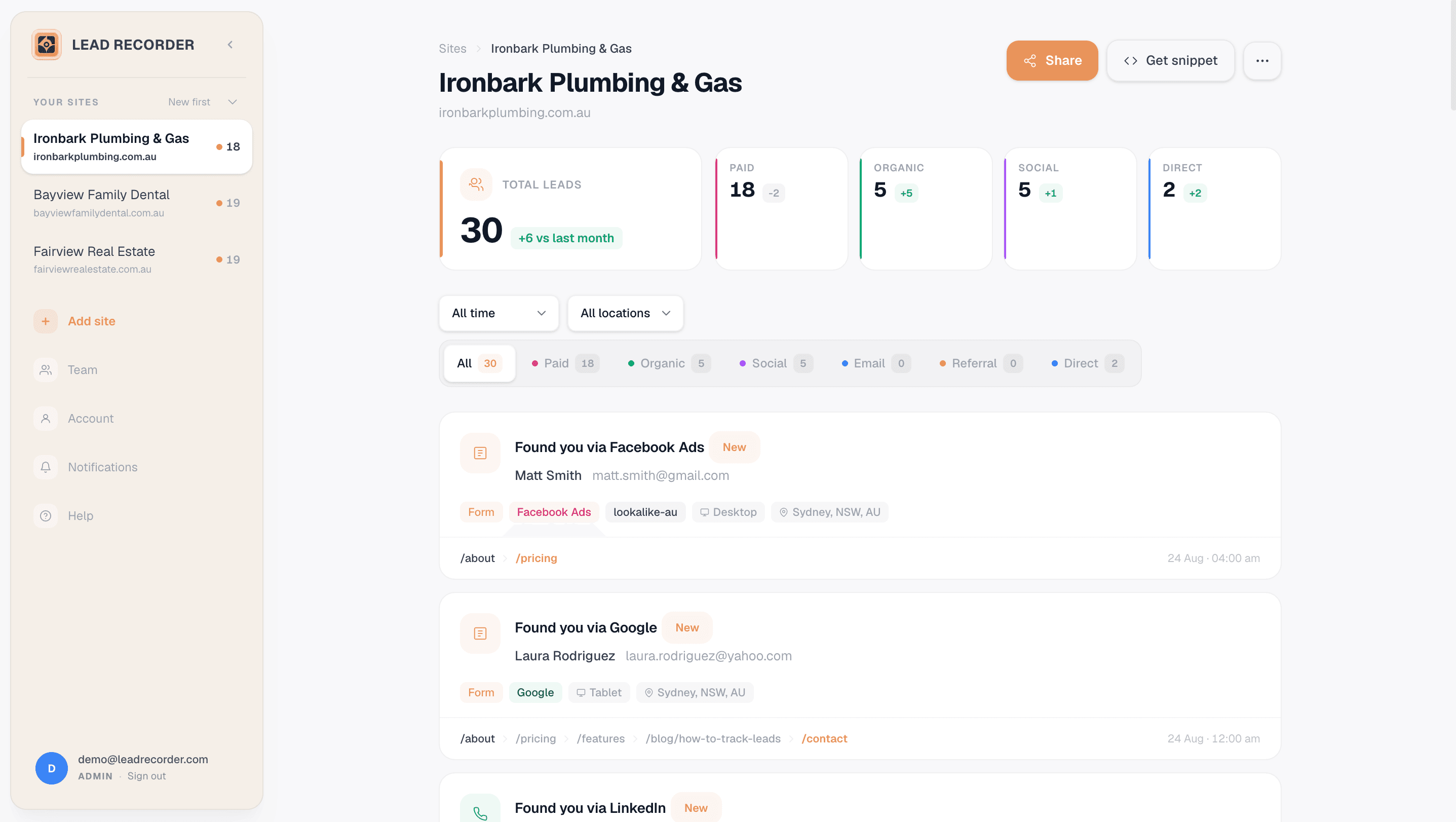
Demo account data. Your own dashboard works the same way.
30 seconds to set up.
Seriously.
Drop one script tag in your site header. Same place you'd put a Facebook pixel. That's the entire setup.
Third-party cookies are on their way out, and per Supermetrics' 2026 Marketing Data Report, 52% of marketing teams don't even own their data strategy. This is first-party data by design: collected straight from your own site, owned by you, not rented from an ad platform. What that actually means.
<head>
  <!-- your tags -->

  <script src=".../api/script/YOUR_KEY" defer></script>

</head>
Paste the snippet
One line in your site header. Works with WordPress, Webflow, Framer, Squarespace, Wix, and anything else with a custom code field.
Visitors get tracked automatically
UTMs, referrer, landing page, device, every page they visit: captured as first-party data you own outright, stored without cookies and with no consent banner needed.
Leads appear in your feed
The moment someone submits a form, clicks your phone number, or books a call, you see it with full source attribution.
See it running on your own site in about 30 seconds.
Start freeBuilt for people who hate analytics
If you've ever stared at GA4 wondering what it means, this is for you.
Business owners
You spend money on ads. You want to know if they're working. Not "sessions", actual humans who called or emailed you.
"I just want to know if my $2,000/month in Google Ads is getting me customers."
Agency account managers
Prove ROI to clients without screenshotting GA4. Send them a link to their lead feed. They'll see it themselves.
"My client doesn't understand GA4. Now I just share their Lead Recorder link."
Freelance web designers
You built the site. Now show your client it's actually generating leads, and where they're coming from.
"Clients used to ask if the site was working. Now they can see for themselves."
How we stack up
A condensed look. See the full breakdown for each.
← Swipe to see every column →
Checked against whatconverts.com/pricing and Google's own documentation, July 2026 — pricing changes, so confirm current numbers before deciding.
We picked WhatConverts and GA4 here since they're the two most common comparisons — CallRail gets the same treatment on its own page.
Rated 5.0 on G2
Real reviews from verified users, not handpicked marketing copy.
“Previously, I found it hard to understand the Google Ads dashboard, but with Lead Recorder, it's just really simple to understand what people are clicking on and how they interact with our business.”


“Lead Recorder gives me data that makes a difference. Understanding where my leads are actually coming from helps me direct my resources to where it has the biggest impact.”

“I like that Lead Recorder is easy to set up and gives clear insights into lead sources. It helps me quickly understand which marketing efforts are working.”

“I like Lead Recorder's simple dashboard, accurate lead tracking, and clear insights that help improve marketing decisions.”

Free to start. Upgrade when you grow.
No credit card. No trial period. The free plan works forever.
Free
- 1 site
- Last 10 leads
- All lead types
- Page journeys
Starter
Everything in Free, plus
- 3 sites
- Unlimited leads
- Lead statuses
- Email support
Growth
PopularEverything in Starter, plus
- 10 sites
- Unlimited leads
- Email alerts
- CSV export
Agency
Everything in Growth, plus
- Unlimited sites
- Unlimited leads
- White label
- Priority support
Frequently asked questions
Common questions from businesses and agencies.
It tells you where each enquiry came from. Someone clicks your phone number, fills in a form or books a call, and Lead Recorder records which ad, Google search, social post or referral brought them to your site in the first place. You get a list of real enquiries with a source next to each one, rather than a chart of sessions.
A few minutes if you know where your site's header is. Paste one script tag, save, and leads start appearing as they happen. There is nothing to configure first, no goals to define, no events to name. If your site is on WordPress the plugin does the pasting for you.
No. It is one script tag in your site header, the same place a Facebook pixel goes. WordPress, Squarespace, Wix, Webflow, Shopify and Framer all have a field for it in settings, and anything else can go through Google Tag Manager. If you would rather not touch it, send us the login or forward the snippet to whoever looks after the site and we will confirm it is firing.
Visit your own site from your phone, tap your phone number, and it should appear in your feed within a few seconds. If nothing shows up, our free script checker will tell you whether the snippet is on the page at all. Most failures are the snippet sitting on the homepage but not the contact page.
Nothing. There is no historical data and we cannot backfill it. Tracking starts the moment the snippet goes live, which is a good reason to install it before you next change anything about your marketing, so you have a baseline to compare against.
From Team in the sidebar (admin only), enter their email and choose Team member or Client. A team member sees every site on the account; a client sees only the one site you pick for them. It emails them an invite link automatically, and also shows you a copyable link in case you'd rather send it yourself. If you just want to send someone a quick read-only view without a login at all, use a site's share link instead.
When someone lands on your site the snippet reads the UTM parameters, the referring site and the landing page URL, then holds that in the browser session. When that person later submits a form, taps a phone number or books a time, we stitch the session to the enquiry. So the source recorded is where they originally came from, not the last page they happened to be on. There is a fuller explanation of how lead sources are grouped in the docs.
Click-to-call phone taps, mailto clicks, and bookings through Calendly, Acuity, GetTimely and other external booking systems. You choose which of these count as a lead on each site, since a mailto click means something different for a law firm than it does for a plumber.
No, and we will not pretend otherwise. A tap opens the dialler. Whether the person pressed call, whether it connected, and whether anyone picked up are all things we cannot see. What we can tell you is that someone was interested enough to tap, and which ad or search produced that. Anyone claiming to track completed calls without a call tracking number is not being straight with you.
Because for a lot of local service businesses the phone is the main way people enquire. Across 1,145 tracked enquiries on nine Australian sites over eleven weeks, 52.7% were phone taps rather than forms. On the plumbing sites in that sample it was 98.1%. That is a product dataset rather than a representative estimate of every business, but if your enquiries look anything like that, form tracking alone is missing most of them.
Only if you connect a Google Ads account. Out of the box you see the channel and the campaign from the UTM, not the keyword. Keyword level data comes from Google, not from the snippet, so it needs the account connection to work.
Because the browser did not tell us where they came from. That happens when someone types your address in, clicks a link in a messaging app, comes from an app's in-built browser, or arrives from a site that strips the referrer. In our own dataset around 19% of leads landed in Direct even with tracking running. We would rather show you that honestly than guess at a source and put a number next to it.
The full page journey. Every page that person visited before enquiring, in order, with time spent on each. That is often the more useful part, since it shows what someone read before they picked up the phone. It is also why last-click reporting can quietly bury the channel doing the real work.
We keep the original source for that browser rather than overwriting it with whatever brought them back. Worth knowing that in our own data 87% of enquiries came on the first visit, with a median of one page and about a minute and a half on site. Multi-visit journeys happen, but they are less common than most attribution advice assumes.
Any site where you can add a line to the header. We have step by step guides for WordPress, Squarespace, Wix, Webflow, Shopify, Framer, GoDaddy and Duda, plus Google Tag Manager for everything else.
Yes, it is in the official WordPress plugin directory. Install it, paste your tracking key, and it adds the script to every page. No theme edits and no tag manager needed. There are separate guides for Divi and Elementor if you build with either.
The script loads with the defer attribute, so it waits until the page has finished rendering. It is one small file and it does not block anything.
Yes. It picks up submissions from Contact Form 7, Gravity Forms, WPForms, Typeform, Jotform and most others, including forms that redirect to a thank you page and ones that show a message in place.
It happens more than people realise. A theme update, a plugin change or a site migration can quietly remove the snippet and nothing looks wrong from the front end. Our free script checker will tell you whether it is still there, and if a site suddenly stops recording leads we will flag it.
GA4 shows you aggregate traffic and anonymous sessions. Lead Recorder shows individual enquiries with the source next to each one, in plain English. GA4 is a genuinely powerful tool if you have the time to learn it and someone to build the reports. Most business owners have neither, and most agencies are tired of explaining it on client calls.
WhatConverts and CallRail are call tracking platforms and they do things we do not, mainly swapping in tracking phone numbers so they can record actual calls. That is real capability and worth paying for if you need it. The difference is billing. They charge by lead, by minute or by number, so a good month costs you more. We charge a flat monthly price by number of sites, with no overage.
No, and it is not trying to be. There is no pipeline, no deal stages and no sales sequences. It records where enquiries came from and hands them to whatever you already use. If you want them in HubSpot, GoHighLevel or Pipedrive, the Zapier connection does that.
If you need to record calls, route them or measure call duration, then yes, and we do not replace that. If what you want to know is which ad or search made someone pick up the phone, the tap tells you that without swapping numbers on your site or paying per minute.
No. Attribution is held in the browser session rather than in a cookie, which is why there is no consent banner needed for the tracking itself. Your own site may still need a banner for other reasons, and that is a question for whoever handles your compliance rather than for us.
You do. It is first-party data collected on your own site, not something rented from an ad platform. You can export it whenever you like and take it with you if you leave.
No. Not using cookies removes one common reason for a consent banner, but privacy obligations depend on your jurisdiction, what you collect elsewhere on the site, and how you use the data afterwards. We can tell you exactly what the script does technically. Whether that satisfies your obligations is worth checking with someone qualified.
Whatever the person typed into your form, which usually means a name, an email address and a phone number, plus the page journey and the source. For phone taps there is no name unless they also filled something in, so you get the source and the journey but not an identity. How that is stored and protected is set out on the security page.
Yes, individually or in bulk, and it is removed rather than hidden. If someone exercises a deletion request with you, you can action it yourself without asking us.
Yes. One site, your last 10 leads, 2,000 sessions a month, all lead types and full page journeys. No credit card and no expiry.
Tracking keeps running and leads keep being recorded, you just cannot see past the most recent 10 until you upgrade. Once you pass the session limit new sessions stop being recorded until the month resets or you move up a plan. We tell you before that happens rather than letting it fail quietly.
No. The price is the price. A busy month costs the same as a quiet one, which is the main reason people move across from usage-billed tools.
Up, down or off, whenever you like, from inside the dashboard. No call to book and nobody trying to talk you out of it. Your data stays available on the free plan if you drop back.
One visit by one browser. If the same person comes back the next day that is a second session. Sessions are how the plan limits are measured, since they scale with how much traffic your sites get.
Yes. Refer someone and earn 30% recurring commission for as long as they stay subscribed, no cap on referrals. Signup is instant and self-serve. If you actually manage installs for clients rather than just sending a link, there's also a certified partner tier with a directory listing on top of the same commission.
Yes, and this is the part most agencies actually come for. Each site has a shareable link that shows a read-only page of that client's leads and sources. No account, no password, no walkthrough. You send a link instead of screenshotting GA4 every month.
Yes, if you turn it on. A client can mark a lead or leave a note on the shared page, which is useful when you want to know which enquiries actually turned into work rather than guessing from the count.
On the Agency plan, yes. The client-facing page carries your branding rather than ours.
Each site sits in its own space with its own snippet, leads and share link, all under one login. Plans go from three sites up to unlimited, and the session allowance on the Agency plan is pooled so a busy client does not cost you a quiet one.
Show them the page. That is genuinely the whole answer. The argument usually comes from the client counting the enquiries they remember and the agency counting conversions in an ad platform, and those two numbers never match. A list of real enquiries with dates and sources ends the conversation faster than a report does.
Yes. If you send someone our way and they subscribe, you earn a share of what they pay for as long as they stay. There is also a certified partner listing for agencies who use it across their client base.
Through Zapier, yes. New leads can flow into HubSpot, GoHighLevel, Pipedrive, Google Sheets, Slack, Mailchimp and a few hundred other things, with the source attached rather than stripped out.
Yes. Email alerts are built in from the Growth plan. If you want it somewhere else, the Zapier connection can post to Slack, Teams, or send an SMS through Twilio, which suits trades who are not at a desk.
Yes. Connect the Lead Recorder MCP server to Claude, whether that is claude.ai, Claude Desktop or Claude Code, and ask it things like which client sites have gone quiet this month or write me a summary for this account. It is read-only, and it never sees a lead's name, email address or phone number.
Yes. Lead Recorder has a ChatGPT plugin: connect it and ask things like which client sites have gone quiet this month or write me a summary for this account. It is read-only, and it never sees a lead's name, email address or phone number. There's also a separate Zapier connection for drafting a reply to each new lead.
CSV export is on the Growth plan and above, and there is an API if you would rather pull it into something yourself. There is also a report generator if what you want is something client-ready rather than raw rows.
Still have questions? Get in touch and we reply within a few hours.
Prefer to see it live? Book a 30-minute walkthrough with Tom.
Free tools for the everyday work
Ungated, no sign-up, built for the same work Lead Recorder does every day.
From the blog
View all posts →
How to Set Up Lead Source Tracking in Under an Hour
Simple Lead Source Tracking Setup: Step-by-Step Guide for Small Teams You need to know where your leads come from. Not eventually. Not when you have tim...

Your CRM Isn't Actually Tracking Where Leads Come From
Why Your CRM Can't Tell You Where Leads Actually Come From Your CRM is lying to you. Not deliberately, but the result is the same: the lead source data ...

7 Lead Tracking Mistakes That Are Costing You Sales
The Most Common Lead Tracking Mistakes Small Businesses Make You're losing sales right now. Not because your product is wrong or your pricing is off. Yo...
Stop guessing.
Start recording.
Your next lead is about to hit your website. Know exactly where they came from.
30 second setup · No credit card · Cancel anytime
Found you via Google Ads · "best plumber near me"
Found you via Organic Search · "emergency electrician"
Found you via Facebook Ads